XAUUSD Contract Specification in MT5: How to Read Every Field
The Specification window shows how your broker defines gold: contract size (usually 100 oz per lot), digits, tick size and tick value, minimum, maximum and step volume, swap type with long and short values, the triple-swap day, sessions, stops level and margin rules. Reading it before your first trade turns lots into dollars.
By CB-Dogs Editorial8 min read
Disclosure: CB-Dogs receives an advertising (referral) fee — sometimes called an IB commission — from brokers for accounts opened or linked through us, and returns part of it to you as cashback, the same model used by cashback and points sites. This does not change your trading costs.
On this page
Every gold symbol on MetaTrader is defined by a contract specification: a table of numbers the broker sets for that symbol. Contract size, tick value, swap and volume limits all live there, and they decide what a "1 lot" order of gold really means in dollars. This guide walks through the Specification window field by field, with example values clearly labelled, so you can read your own broker's numbers instead of guessing.
Key takeaways
- Open it on MT4 or MT5 desktop with Market Watch > right-click the symbol > Specification (MT4 also calls it Contract Specification). On MT5 mobile, tap the symbol in Quotes and choose Properties.
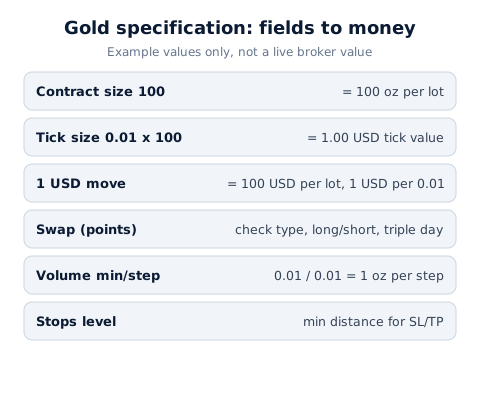
- Contract size is the number of ounces in one lot. Most gold symbols use 100 oz per standard lot, so a 1 USD move is worth about 100 USD per lot and 1 USD per 0.01 lot. Always confirm it on your own symbol.
- Tick size and tick value give the money per smallest price step. Swap is shown with a type (often points), a long value and a short value, plus the weekday that carries triple swap.
- Every value is set by the broker and can change. The numbers in this article are examples for learning, not any broker's live values.
- For cashback, the broker pays the IB commission per standard lot (100 oz for gold), so the contract size and volume fields are what turn your trade size into the lots that count.
How to open the Specification window
MT5 on desktop. Open Market Watch (View > Market Watch, or Ctrl+M). If gold is not listed, right-click the list, choose Symbols, and add it. Then right-click the gold symbol and choose Specification.
MT4 on desktop. In Market Watch, right-click the symbol and choose Specification, or select the symbol and use the Properties button. MetaQuotes' MT4 help describes this as the Contract Specification window.
MT5 on Android or iPhone. Open the Quotes tab, tap the symbol to open its menu, and choose Properties. It shows spread, digits, stops level, contract size, margin and swap information as defined by your broker.
Gold can have several symbols on one broker. XMTrading, for example, lists GOLD (Standard), GOLDmicro (Micro), GOLD# (KIWAMI) and GOLD. (Zero), and each has its own specification. Open the one you will actually trade, not one with a similar name. Our XM gold spread and trading conditions guide shows how they differ.
Field by field: what each line means in money
The example column below uses a hypothetical gold symbol priced near 2,000 USD. It is a teaching example, not a live value.
| Field | Example value | What it means for gold |
|---|---|---|
| Contract size | 100 | Ounces in 1 lot |
| Digits | 2 | Prices show 2 decimals, such as 2000.15 |
| Tick size | 0.01 | Smallest price step |
| Tick value | 1.00 USD | Profit or loss per tick for 1 lot |
| Volume min / max / step | 0.01 / 50 / 0.01 | Smallest order, largest order, increment |
| Margin currency | USD | Currency the margin is held in |
| Swap type | In points | How swap is expressed |
| Swap long / short | -80 / +20 | Overnight value for buys and sells |
| 3-day swap | Wednesday | Day that carries triple swap |
Contract size
Contract size is the number of units in one lot. For gold the unit is the ounce. With a value of 100, one lot controls 100 oz, so the position value is price times 100 (about 200,000 USD at a 2,000 USD price) and each 1 USD move changes profit by 100 USD. At 0.01 lot you hold 1 oz, so 1 USD of movement is 1 USD. Some micro-style symbols define a lot differently, so never assume. Our how much is 1 lot of gold guide works through the sizes, and how to calculate gold profit turns them into profit and loss.
Digits and point
Digits is the number of decimals in the quoted price. With 2 digits the smallest displayed change is 0.01, which MetaTrader calls one point. Some brokers quote 3 digits, which makes a point 0.001. This is why "gold pips" are not standardised: a pip is a convention, a point is the platform's unit. When you compare costs, convert to dollars of price movement. More in gold stop loss in pips and dollars.
Tick size and tick value
Tick size is the minimum price change the symbol allows. Tick value is the money gained or lost per tick for one lot, in the account or margin currency. A useful check:
tick value = tick size x contract size
With a tick size of 0.01 and a contract size of 100, the tick value is 0.01 x 100 = 1.00 USD per lot per tick. If your symbol shows different numbers, do the same multiplication and see whether it matches. When the tick value is shown in a deposit currency other than USD, it is converted at the current rate and drifts slightly.
Volume: minimum, maximum and step
Minimum volume is the smallest order, step is the increment, and maximum is the largest single order. With a 0.01 minimum and a 0.01 step you can trade 0.01, 0.02, 0.03 and so on. XMTrading's help centre states a minimum of 0.01 lot and a maximum of 50 lots for Standard accounts, while Micro accounts use a different lot definition and a 0.1 lot minimum on MT5. Check your own symbol, and see XM maximum lot size and position limits.
Margin currency and margin rates
Margin currency is the currency in which the required margin is calculated and held. The margin fields (initial and maintenance, or margin rates) show how much of the position value must be set aside. The result also depends on your account leverage: the same lot needs less margin at higher leverage. Some MT5 servers show a list of margin rates by order type; others show only a calculation method. The practical test is to enter a lot size in the New Order window, where the platform shows the margin required.
Swap type, long, short and triple-swap day
Swap is the overnight cost or credit for holding a position past the daily rollover. The window shows:
- Swap type. MetaTrader allows points, an amount in the base, margin or deposit currency, or a percentage of price. For gold, "in points" is common.
- Swap long and swap short. The values for buy and sell positions. Negative means a charge, positive a credit. They are not mirror images.
- 3-day swap (triple swap). The weekday on which three days of swap are charged to cover the weekend. For spot gold at XMTrading it is Wednesday.
For a points-based swap, a rough conversion is swap points x tick size x contract size / (points per tick). If one point equals one tick, as in the example above, -80 points x 0.01 x 100 = -80 USD per lot for a buy held overnight, or -0.80 USD per 0.01 lot. The exact conversion depends on how your broker defines a point, so test with a small position and read the swap column in the trade window. XMTrading's instruments page showed gold swap in points on 2026-10-01, with rollover at 00:00 GMT+2 and triple swap on Wednesday; the values change daily. Details are in our XM gold swap guide.
Sessions
The Sessions section lists quote and trade hours for each day of the week, in server time. XMTrading's terminal uses GMT+2 in winter and GMT+3 in summer, and you cannot change it. Gold has a short daily break, and spreads can widen around it. Convert the times to your own time zone before you plan around them.
Stops level and spread
Stops level is the distance, in points, within which you cannot place a stop loss, take profit or pending order relative to the current price. A level of 0 means the symbol enforces no minimum, though the real spread still affects where your orders trigger. The window also shows the current spread in points. With 2 digits, a spread of 25 points is 0.25 USD per ounce, which is 25 USD for one standard lot just to cross the spread.
Why the specification matters for cashback
Cashback from CB-Dogs is a share of the IB commission the broker pays on your trades. XMTrading's publicly available partner terms say commission is paid per standard lot round turn, and for gold one standard lot is 100 oz. A Micro lot counts as one hundredth of a standard lot. Exness pays on its own basis. So the contract size and volume fields decide how much of your trading counts as lots in the broker's report.
Two practical consequences. First, 1 lot on a Standard symbol (100 oz) and 1 lot on a micro-style symbol are very different amounts of gold and of commission. Second, the size in the order window is volume, not ounces. Multiply volume by contract size to get ounces, then divide by 100 to get standard-lot equivalents. Do not rely on a remembered per-lot figure; use the live table below, and see our gold cashback per lot explainer.
| Account type | Rebate / lot (USDT) |
|---|---|
| StandardSpread-based account, no commission. | 1.8 |
| MicroShown per micro lot (1,000 units), which is 1/100 of a standard lot, so the amount is 1/100 of the Standard amount. | 0.018(1 micro lot = 1,000 units) |
| KiwamiXM's tightened-spread account tier available in select regions. Our rebate for this account type is still being confirmed with XM and will be added here. | Rate to be confirmed |
| ZeroCommission-based account. Rebate is paid in addition to the raw spread, and the commission you pay is unaffected. Our rebate for this account type is still being confirmed with XM and will be added here. | Rate to be confirmed |
Provisional rate
Cashback is 60% of the IB commission the broker actually pays. Trades the broker does not count, such as very short ones, earn nothing. Cashback depends on volume, not on whether the trade made money.
A quick checklist before your first gold trade
- Open the Specification for the exact symbol you will trade.
- Write down contract size, minimum volume and step.
- Compute tick value (tick size x contract size) and compare it with the shown value.
- Check swap type, long and short values, and the triple-swap day.
- Note the session break in your own time zone. If you are still choosing a platform, read XM MT4 vs MT5.
- Place a 0.01 lot test order on a demo account and confirm the margin and the profit per dollar of movement.
FAQ
On desktop, open Market Watch, right-click the gold symbol and choose Specification. In the mobile app, tap the symbol in the Quotes tab and choose Properties. In MT4 the window is called Contract Specification.
Risk warning: forex and CFD trading carries a high risk of losing money. Cashback does not offset trading losses. Nothing here is investment advice.
Related articles
Cashback on your XM trades — free, paid in USDT
Sign up free