How to Open an Exness Account and Link It to Your Cashback
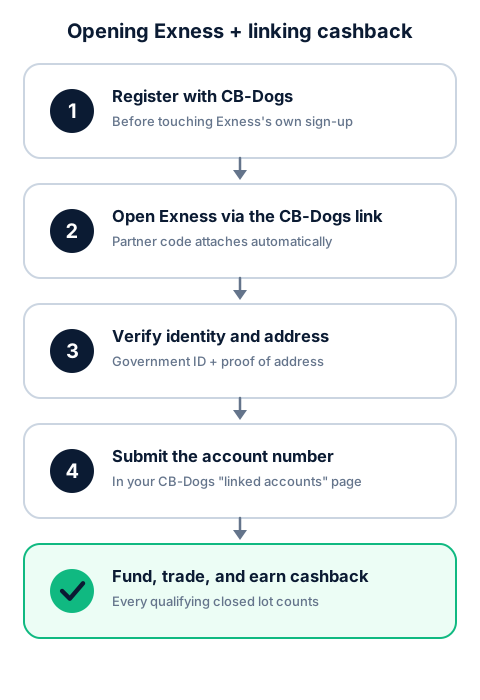
To earn CB-Dogs cashback on Exness, register with CB-Dogs and open your Exness account through our link before you trade, complete Exness's identity verification, then submit your Exness account number in your CB-Dogs account so your trading can be matched to your profile.
By CB-Dogs Editorial6 min read
Disclosure: CB-Dogs receives an advertising (referral) fee — sometimes called an IB commission — from brokers for accounts opened or linked through us, and returns part of it to you as cashback, the same model used by cashback and points sites. This does not change your trading costs.
On this page
- The short answer
- Step 1: Register with CB-Dogs first
- Step 2: Open your Exness account through the CB-Dogs link
- Step 3: Verify your identity and address
- Step 4: Submit your Exness account number to CB-Dogs
- Step 5: Fund your account and start trading
- Already have an Exness account? Use the partner change process instead
- Common mistakes that break tracking
- Frequently asked questions
- Related reading
Our Exness withdrawal guide covers what happens once you're trading and ready to take money out. This article covers what comes first: opening your Exness account the right way so your trading is tracked for CB-Dogs cashback from your very first closed lot, and what to do instead if you already have an Exness account from before you found us.
Key takeaways
- The order matters: register with CB-Dogs and open your Exness account through our link before you create an Exness profile any other way.
- Exness registration itself is short — email, password, country of residence — followed by identity verification (ID and proof of address) before you can fund and trade.
- A partner (IB) code has to be attached at registration for Exness to know which partner referred you; using CB-Dogs' own referral link does this automatically, without you having to type a code by hand.
- CB-Dogs can only track trading on an Exness account that's actually linked to our partner relationship — after opening through our link, you still need to submit your Exness account number in your CB-Dogs account to complete the connection.
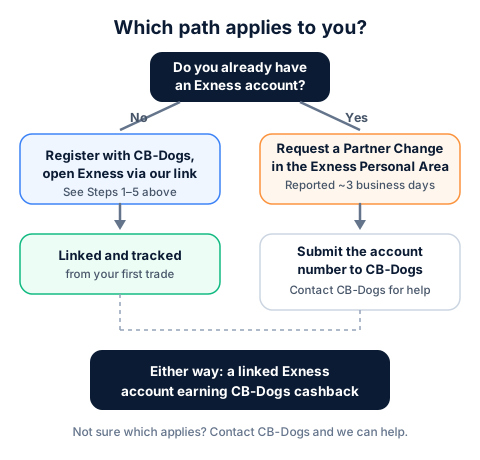
- If you already have an Exness account opened directly or through someone else, Exness offers a Partner Change request from its Personal Area — contact CB-Dogs and we can help with that request.
The short answer
Register with CB-Dogs first, then open your Exness account by clicking through the Exness link on your CB-Dogs profile (or on our Exness broker page) rather than going to Exness directly. Exness's own sign-up is a short email-and-password registration, followed by identity verification before you can fund and trade. Once your account is open, submit your Exness account number in your CB-Dogs account so the connection is confirmed on our side too — from there, every closed lot that qualifies under Exness's own trading rules and CB-Dogs' terms starts building toward cashback.
Step 1: Register with CB-Dogs first
This is the step that determines everything else. CB-Dogs can only track trading that Exness reports against our own partner relationship — if your Exness account was opened directly, or through a different partner's link, it isn't automatically visible to us, and there's no way to retroactively attach it after the fact. Register with CB-Dogs before you touch Exness's own sign-up page.
Step 2: Open your Exness account through the CB-Dogs link
From your CB-Dogs profile, or the "open an account" button on our Exness broker page, click through to Exness rather than searching independently or reusing an old bookmark. Exness's partner (IB) code has to be attached at the moment your account is created for Exness to know which partner referred you — a partner's own referral link handles this automatically, carrying that tracking information itself, without you needing to find or type a code by hand.
If you ever end up on Exness's registration page some other way, look for a field labeled Partner Code, IB Code, or similar, and make sure the correct code is entered before you finish registering — exactly what the CB-Dogs link avoids by filling it in for you.
Step 3: Verify your identity and address
Exness, like other regulated and licensed brokers, requires identity verification before you can fund and trade — typically a government-issued ID and proof of your residential address. This is standard know-your-customer (KYC) practice across the industry, not something specific to CB-Dogs. Submitting clear, current, correctly matched documents the first time is the biggest factor in avoiding a rejection-and-resubmission cycle.
Step 4: Submit your Exness account number to CB-Dogs
Opening an Exness account through our link starts the tracking on Exness's side, but confirming it on your CB-Dogs side closes the loop. Go to your linked accounts in your CB-Dogs account and submit your new Exness account number. This lets us match your trading activity to your CB-Dogs profile and gives you a clear record of which of your accounts are actually connected.
Step 5: Fund your account and start trading
Once verified and linked, you can deposit and place trades. From that point, every closed lot that qualifies under Exness's own trading rules and CB-Dogs' terms starts building toward cashback, credited after Exness reports the underlying commission to us. See how forex rebates work for the full mechanics of how that partner commission turns into your rebate, and use the cashback calculator to estimate what your trading volume could earn.
| Account type | Rebate / lot (USDT) |
|---|---|
| StandardNo separate commission — Exness pays partners a share of the spread. The estimate below is for EURUSD at our current partner rank; GBPUSD and gold (XAUUSD) typically pay more per lot, tighter-spread pairs less. Rates rise automatically as our trading volume with Exness grows. | 0.96 |
| ProNo separate commission — Exness pays partners a share of the spread, at a lower percentage than Standard. We don't yet have a reliable per-instrument estimate for this account type, so no figure is shown; your cashback is still 60% of the actual commission Exness pays us. | 0.0 |
| ZeroCommission-based account with near-zero raw spreads. The estimate below is for EURUSD at our current partner rank; other instruments vary. Cashback is paid in addition to the raw spread and does not affect the commission you pay Exness. | 0.25 |
| Raw SpreadCommission-based account with raw interbank spreads. Exness pays partners a fixed amount per lot that varies by instrument; we don't yet have a reliable figure to show, so no estimate is listed — your cashback is still 60% of the actual commission Exness pays us. | 0.0 |
Provisional rate
Already have an Exness account? Use the partner change process instead
If you opened an Exness account before finding CB-Dogs — directly, or through a different partner — you generally can't move that existing account's tracking to CB-Dogs by opening a "new" account with the same identity, since Exness verifies one identity per client rather than treating every new signup as a fresh person. Exness offers a Partner Change (sometimes shown as Partner Switching) request from its own Personal Area instead: you request the change, confirm it (typically by a code sent to your registered email or phone), and Exness processes it — reported to take roughly 3 business days.
Common mistakes that break tracking
- Opening the Exness account before registering with CB-Dogs. Tracking depends on the partner-link click happening first; registering with CB-Dogs afterward doesn't retroactively attach an account you already opened elsewhere.
- Switching devices or clearing cookies between clicking the link and finishing registration. This can interrupt the tracking Exness uses to attribute your new account to CB-Dogs' partner relationship.
- Forgetting Step 4. Opening the account through our link is necessary but not sufficient on its own from your side — submitting your account number in your CB-Dogs account is what confirms the link and lets you track your status.
- Assuming a demo account counts. A demo account trades with simulated funds and generates no real commission for Exness to pay CB-Dogs, so it can't produce cashback. See our demo vs. live accounts and forex cashback guide for the distinction.
Frequently asked questions
Before. Register with CB-Dogs first, then open your Exness account through the link on your CB-Dogs profile or our Exness broker page, so the account is attributed to CB-Dogs' partner relationship from the start.
Related reading
- Exness withdrawal: methods, processing times and fees — what happens once you're trading and ready to take money out.
- Demo vs. live accounts and forex cashback — why only a live account generates cashback.
- How forex rebates work — the mechanics behind the rebate your new account starts earning.
- Exness broker page — the account-opening link and current cashback rates.
- Cashback calculator — estimate your rebate before you open an account.
- How it works — how CB-Dogs is paid and what we share with you.
Risk warning: forex and CFD trading carries a high risk of losing money. Cashback does not offset trading losses. Nothing here is investment advice.
Related articles
Cashback on your XM trades — free, paid in USDT
Sign up free