What a USDT (TRC20) Wallet Address Looks Like — and How to Find Yours
A valid USDT TRC20 (TRON) wallet address is exactly 34 characters long, always starts with a capital T, and uses Base58 encoding, which never includes the digit 0 or the letters O, I, or l — an address starting with 0x is a different network, not TRC20.
By CB-Dogs Editorial6 min read
Disclosure: CB-Dogs receives an advertising (referral) fee — sometimes called an IB commission — from brokers for accounts opened or linked through us, and returns part of it to you as cashback, the same model used by cashback and points sites. This does not change your trading costs.
On this page
Before your first USDT payout — from CB-Dogs or anywhere else — you need one thing: a TRC20 wallet address that's actually yours, and confidence that you're looking at the right one. This guide covers exactly what a valid address looks like, where to find yours in a wallet or exchange app, how it differs from other networks, and how CB-Dogs checks the address you register.
Key takeaways
- A valid USDT TRC20 address is always 34 characters long and starts with a capital T — no exceptions.
- TRC20 addresses use Base58 encoding, which deliberately never includes the digit 0 or the letters O (capital o), I (capital i), or l (lowercase L), so those characters can't appear anywhere in a real address.
- An address starting with "0x" is an Ethereum (ERC20) or BNB Smart Chain (BEP20) address, not TRC20 — CB-Dogs cannot accept it.
- An exchange deposit address and a self-custody wallet address both look like ordinary TRC20 addresses, but only one of them is a private key you personally control.
- CB-Dogs only accepts addresses starting with T for payouts, and pauses withdrawals for 24 hours after you change your registered address.
What a valid TRC20 address actually looks like
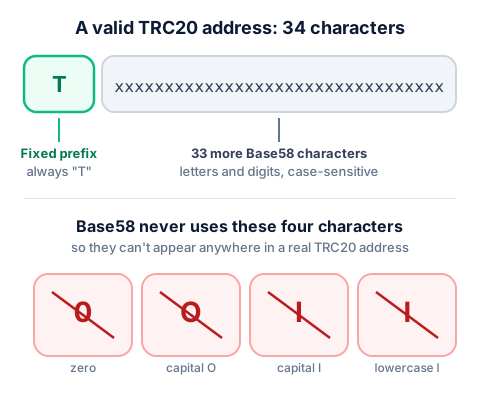
A TRC20 (TRON) address is a string of exactly 34 characters, and it always starts with a capital T. The remaining 33 characters are a mix of upper- and lowercase letters and digits, generated by the TRON network itself — you never choose or edit any part of it yourself.
Here's a clearly fake placeholder in the right shape, so you know what you're looking for — this is not a real address, just a stand-in for the format:
TXXXXXXXXXXXXXXXXXXXXXXXXXXXXXXXXX
That format isn't arbitrary. TRON addresses are encoded using a scheme called Base58Check, the same family of encoding Bitcoin popularized. Base58 was deliberately designed to exclude characters that are easy to confuse when read or typed by hand: the digit 0 (zero), the capital letter O, the capital letter I, and the lowercase letter l (lowercase L) are all left out on purpose. If you ever see one of those four characters in something claiming to be a TRC20 address, that's a signal to look again — either it isn't a real TRC20 address, or you've misread another character nearby.
That said, a correct length and prefix only confirm an address is shaped like a valid TRC20 address — not that it's your address, or the one you meant to copy. For that risk — including how scammers plant a lookalike address in your transaction history — see our guide to USDT safety, scams, and address poisoning.
How to find your TRC20 address in a wallet or exchange
The exact screen names differ between apps, but the underlying steps are the same almost everywhere a wallet or exchange supports TRC20:
- Open the app and search for USDT. Most wallets list USDT once for each network they support, so you'll typically see more than one result.
- Select the option labeled TRC20 or TRON specifically. This is the step people most often get wrong — picking a USDT listing for a different network by mistake.
- Tap Receive (sometimes labeled Deposit). The app shows a QR code and the address as text underneath it.
- Check the network label shown on that screen one more time. If it says TRC20 or TRON, and the address starts with T and runs 34 characters, you're looking at the right one.
- Copy the address exactly, ideally by tapping the copy icon rather than selecting and retyping it by hand.
In Trust Wallet specifically — a common, beginner-friendly choice for receiving USDT — this is search USDT, select the result labeled TRC20, tap Receive, and copy the address shown. Our Trust Wallet TRC20 setup guide covers this with screenshots-style step detail, from installing the app through finding this exact screen.
On an exchange like Binance, the equivalent screen sits under something like Wallet → Deposit → Crypto, where you search for USDT and then choose the TRC20 network before the address and QR code appear. If you're moving funds out of an exchange rather than finding a receiving address, our guide to sending USDT (TRC20) from an exchange walks through that direction instead.
How TRC20 differs from ERC20 and BEP20 addresses
USDT exists on several blockchains at once, and each version has its own address format. The practical difference you'll actually see:
- TRC20 (TRON) addresses start with a capital T and run 34 characters.
- ERC20 (Ethereum) and BEP20 (BNB Smart Chain) addresses instead start with "0x" and follow a different format entirely.
These aren't cosmetic differences — the networks don't communicate with each other, so an address formatted for one network generally can't receive a transfer sent on another. If your wallet shows you an address starting with "0x" where you expected a TRC20 one, you're looking at the wrong network's address, not a variant of the right one. For the full comparison — including why CB-Dogs and most rebate programs standardize on TRC20 specifically — see TRC20 vs ERC20 vs BEP20, which covers this ground in more depth than repeated here.
Exchange deposit address vs. self-custody wallet address
Not every TRC20 address is the same kind of thing, even though they're all formatted identically. It's worth understanding the difference before you register one anywhere:
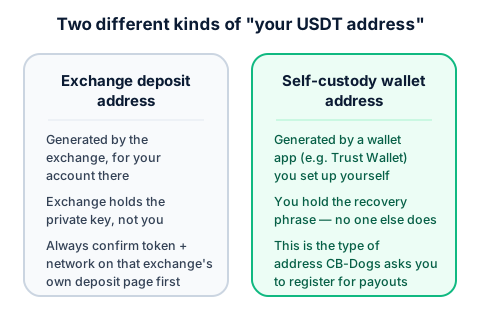
- An exchange deposit address is generated by the exchange, tied to your account on that specific platform, and the exchange — not you — holds the private key behind it. It's meant for depositing funds into your balance on that exchange, following whatever rules that exchange sets (always check its own deposit page for the current network and any minimum amount).
- A self-custody wallet address comes from a wallet app (like Trust Wallet) that you set up yourself, where you alone hold the recovery phrase. Nobody else — not the wallet developer, not CB-Dogs — has access to funds sent there unless you share that recovery phrase with them.
For CB-Dogs payouts, register a self-custody address you control, not a deposit address borrowed from an exchange account, unless you've specifically confirmed that exchange correctly credits third-party TRC20 deposits under your account. The two are easy to mix up, not because the address format differs, but because who actually controls the funds does.
How CB-Dogs validates the address you register
CB-Dogs only accepts a TRC20 (TRON) address starting with a capital T for payouts — the format checked above is the same one enforced when you register or update your withdrawal address. An address in any other format, including anything starting with "0x", simply isn't accepted.
As a security measure, changing your registered address pauses withdrawals for 24 hours afterward. That's not a punishment for making a change — it's a deliberate delay so that if someone else gained access to your account and tried to redirect a pending payout, there's a window to notice and react before anything actually goes out. If you're expecting a payout soon, update your address well ahead of time rather than right before requesting a withdrawal.
Frequently asked questions
Exactly 34. It always starts with a capital T, followed by 33 more characters generated by the TRON network.
Related reading
- How to set up a Trust Wallet for USDT (TRC20) payouts — installing the app and finding your receive address, step by step.
- How to send USDT (TRC20) from an exchange — the other direction: moving funds out to a wallet you control.
- TRC20 vs ERC20 vs BEP20 — why the network matters and how the formats differ.
- USDT safety, scams, and address poisoning — verifying an address safely, including the address-poisoning scam.
With your address ready, register with CB-Dogs and add it to your payout settings before your first withdrawal — or check our wallet setup guide if you haven't created one yet.
Risk warning: forex and CFD trading carries a high risk of losing money. Cashback does not offset trading losses. Nothing here is investment advice.
Related articles
Cashback on your XM trades — free, paid in USDT
Sign up free