How to Set Up a Trust Wallet for USDT (TRC20) Payouts
A step-by-step guide to installing Trust Wallet, adding USDT on the TRC20 network, and finding the receiving address for your CB-Dogs payout.
By CB-Dogs Editorial5 min read
Disclosure: CB-Dogs earns a commission (IB rebate) from brokers for accounts opened or linked through us and pays part of it back to you as cashback. This does not change your trading costs.
On this page
- What you'll need
- Step 1 — Install Trust Wallet and create a wallet
- Step 2 — Add USDT on the TRC20 network specifically
- Step 3 — Find your receive address and double-check the network
- Step 4 — Copy your address into your CB-Dogs payout settings
- Common problems
- Keeping your wallet safe
- How this fits into getting paid
- Frequently asked questions
- Ready to receive your first payout?
If you've never used a crypto wallet before, receiving a payout can feel like the hardest part of getting forex cashback — it isn't. Trust Wallet is a free app that takes a few minutes to set up, and once it's holding a USDT (TRC20) address, you'll reuse that same address for every future payout. This guide walks through installing the app, adding USDT on the correct network, and finding the address to give CB-Dogs.
What you'll need
- A smartphone (Trust Wallet is available for iOS and Android) or a desktop browser extension, if you prefer that instead.
- About five minutes.
- Nothing to buy. You don't need to own any cryptocurrency to receive a payout — you're only creating a place for it to arrive.
Step 1 — Install Trust Wallet and create a wallet
Install Trust Wallet only from the official Apple App Store or Google Play listing, or from the official trustwallet.com website. Avoid links from ads, forum posts, comment sections or unofficial APK downloads — a modified copy of the app can be built to steal funds, and the difference isn't visible from the outside.
During setup, the app generates a recovery phrase — typically 12 or 24 words — that's the master key to everything the wallet ever holds. Write it down on paper and store it somewhere offline. Don't screenshot it, don't save it in a notes app or cloud drive, and don't type it into any website or message.
Step 2 — Add USDT on the TRC20 network specifically
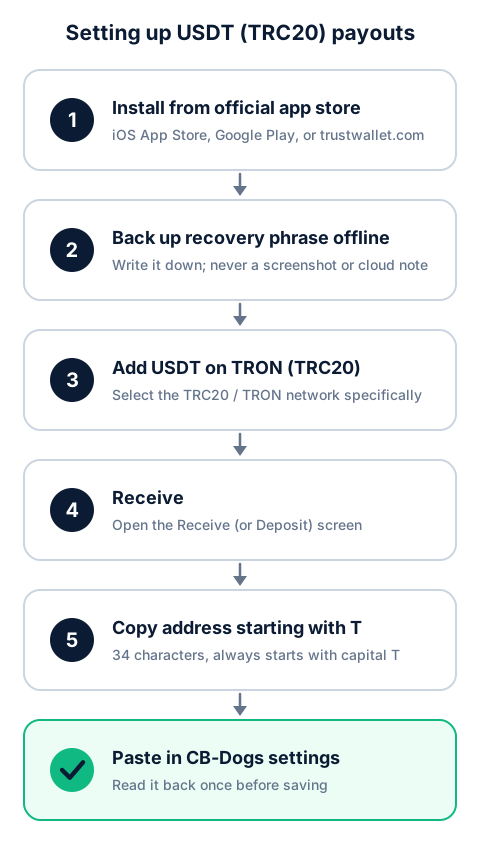
Open Trust Wallet and use its search or "add token" function to look up USDT. Because USDT exists on several blockchains, you'll typically see more than one result — one for each network Trust Wallet supports, such as Ethereum, BNB Smart Chain and TRON. Select the one labeled TRC20 or TRON. Labels and icon placement can differ slightly by app version, but the underlying step is always the same: you're choosing the TRON version of USDT, not any other network's version.
Step 3 — Find your receive address and double-check the network
Once USDT (TRC20) is added to your wallet, open it and look for a Receive option (sometimes shown as "Deposit"). If the app asks you to confirm a network, choose TRC20 or TRON again. Trust Wallet will then show you a QR code and an address underneath it.
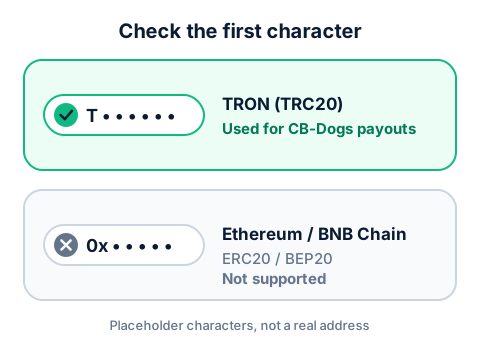
As a quick sanity check before you copy anything: a TRC20 (TRON) address is 34 characters long and always starts with a capital "T". An Ethereum or BNB Smart Chain address looks different and starts with "0x" — if you ever see an address starting with "0x" where you expected a TRC20 one, you're looking at the wrong network.
Step 4 — Copy your address into your CB-Dogs payout settings
Tap or long-press the address to copy it exactly, then paste it into your CB-Dogs payout settings. Read it back once before saving — a single mistyped or wrongly pasted character produces a different address, and USDT sent to the wrong address usually can't be recovered.
As a security measure, withdrawals are paused for a short period (currently 24 hours) after you change your registered address, so update it well ahead of a payout you're expecting rather than right before requesting one.
Common problems
"I don't see USDT (TRC20) in my wallet"
Search for "USDT" again and check whether the token list is filtered to only the networks you've already added. Some wallet versions hide networks you haven't explicitly enabled until you add them manually first, then search for USDT again — the exact wording ("Manage tokens," "Add custom token," or similar) varies by app version.
"I sent to the wrong network — what now?"
Trust Wallet and other major wallets consistently warn that sending on a mismatched network — for example, USDT sent as TRC20 to an address that only works on Ethereum — typically results in permanent loss of funds, since the networks don't communicate with each other. If this happens, check whether the receiving platform offers manual recovery for cross-network deposits (a minority of exchanges do, in limited cases); don't assume it's possible. Prevention — always confirming the network before sending or sharing an address — is the reliable fix.
"Do I need TRX to receive USDT?"
Receiving USDT on TRC20 doesn't cost you anything, and you don't need to hold any TRX (TRON's native coin) just to receive it.
TRX only becomes relevant later, if you want to send USDT out of your wallet somewhere else — TRC20 transfers use a TRON resource called "energy," which your wallet may cover automatically or ask you to fund with a small amount of TRX, depending on your balance and the app version.
Keeping your wallet safe
A few habits cover most of what matters day to day:
- Only ever install Trust Wallet from the official app store listing or trustwallet.com.
- Keep your recovery phrase offline and never enter it anywhere except directly inside the Trust Wallet app during setup or recovery.
- Be skeptical of anyone contacting you claiming to be "CB-Dogs support" and asking for your recovery phrase, private key, or remote access to your device — legitimate support never needs any of these.
- Before requesting a withdrawal, glance at your registered address once more to confirm it's still correct, especially if you've switched devices or reinstalled the app recently.
How this fits into getting paid
Once your TRC20 address is registered, the rest of the payout process runs the same way for every future payout. Cashback is credited to your CB-Dogs balance after the broker pays us the underlying commission, then becomes withdrawable after a short confirmation period (for XM, 7 days after crediting). Once your withdrawable balance reaches the minimum — currently 10 USDT — you can request a payout: withdrawals of 50 USDT or more are fee-free, and a flat 3 USDT fee applies below that. For XM, the whole path from a trade to a withdrawable balance typically runs around three to four weeks, as a general guide rather than a guarantee. Referral earnings follow the same pattern, unlocking 7 days after the corresponding cashback itself becomes withdrawable. For the full walkthrough, see forex rebates paid in USDT.
Frequently asked questions
No. You just need a wallet that can hold USDT on TRC20, which is free to set up. Receiving costs you nothing, and TRX is only needed later if you want to send USDT onward from your wallet.
Ready to receive your first payout?
With your TRC20 address set up, you're ready to start earning. See how TRC20 compares to other networks in TRC20 vs ERC20 vs BEP20, check the full payout process in forex rebates paid in USDT, or go ahead and register with CB-Dogs before opening your broker account.
Risk warning: forex and CFD trading carries a high risk of losing money. Cashback does not offset trading losses. Nothing here is investment advice.