How to Check a USDT TRC20 Transaction on Tronscan (Step by Step)
To check a USDT TRC20 transaction, paste its transaction hash (TXID) into the search bar at tronscan.org and confirm the status shows success, the token transferred matches USDT, and the To address and amount are exactly what you expect.
By CB-Dogs Editorial5 min read
Disclosure: CB-Dogs receives an advertising (referral) fee — sometimes called an IB commission — from brokers for accounts opened or linked through us, and returns part of it to you as cashback, the same model used by cashback and points sites. This does not change your trading costs.
On this page
A USDT TRC20 payout doesn't come with a bank-style confirmation email you can just trust at face value — but it does come with something better: a transaction hash (TXID) you can look up yourself, independently, on the TRON network's public record. This guide walks through reading a TRC20 transaction on Tronscan, what each field means, and what to do if a payout you're expecting hasn't shown up yet.
Key takeaways
- Tronscan (tronscan.org) is the standard public block explorer for the TRON network — paste a transaction hash (TXID) into its search bar to look up any TRC20 transfer, including a CB-Dogs payout.
- A TRON transaction hash is a 64-character string of lowercase letters and numbers, with no "0x" at the start.
- Check five things on the result: the status, the token and amount transferred, the sending (From) address, the receiving (To) address, and whether it's confirmed.
- A "pending" status usually resolves within a short wait; a TXID that returns no result at all is a different problem and worth following up on directly.
- Every CB-Dogs withdrawal is marked paid together with its TXID, and paid-out totals are published on our public payouts page so you can verify independently.
Where your TXID comes from
Before you can look anything up, you need a transaction hash (TXID) — a unique identifier assigned to that specific transfer on the TRON blockchain. A TRON TXID is a 64-character string of lowercase letters and digits, with no "0x" prefix (that prefix belongs to Ethereum-style hashes, not TRON's).
For a CB-Dogs payout, the TXID comes attached to the withdrawal itself: when a withdrawal is marked paid, it's recorded together with the transaction hash, and paid withdrawals — amount, masked recipient, and TXID — are published on our public payouts page, each one already linking straight to its Tronscan record. If you're checking a transfer from somewhere else — an exchange withdrawal, for instance — the exchange's own withdrawal or transaction history is typically where it shows the TXID once the transfer has been broadcast.
Step by step: reading a transaction on Tronscan
- Go to tronscan.org, the standard public explorer for the TRON network.
- Paste the transaction hash (TXID) into the search bar at the top of the page and search. You can also search by wallet address if you want to see a list of recent transfers rather than one specific transaction.
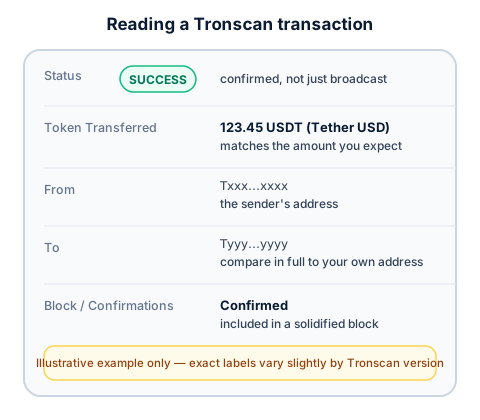
- Check the status. A completed, confirmed transfer typically shows a clear success indicator (commonly labeled "SUCCESS" or similar). A transaction still being processed shows as pending instead.
- Check the token and amount. The page should show the token transferred as USDT (sometimes shown with its full name, "Tether USD") along with the exact amount — compare this against the amount you were expecting.
- Check the From and To addresses. Compare the "To" address in full against your own receiving address, not just the first and last few characters — the same care covered in our guide to USDT safety and address poisoning.
- Check that it's confirmed, not just broadcast. TRON produces new blocks roughly every few seconds, so confirmation is usually quick, but treat the confirmed status — not just the fact that a TXID exists — as the real signal that a transfer is final.
What "pending" and "failed" actually mean
- Pending means the transaction has been broadcast to the network but hasn't yet been included in a confirmed block. On TRON this is usually brief, given how frequently new blocks are produced — but "usually brief" isn't a guarantee, so don't assume something is wrong the moment you check and see pending.
- A transaction that can't be found at all — no result for the TXID you searched — is a different situation from pending. It generally means the transfer either hasn't been broadcast yet on the sending side, or the TXID was copied or entered incorrectly. Double-check the string, character by character, before concluding something's actually wrong.
- A genuinely failed transfer (as opposed to one that's merely pending or not yet found) is uncommon for a straightforward USDT transfer once it's been broadcast, but if a status ever shows something other than success or pending, treat that as a reason to contact whoever sent the transfer directly, TXID in hand, rather than guessing at the cause yourself.
If a payout hasn't arrived yet
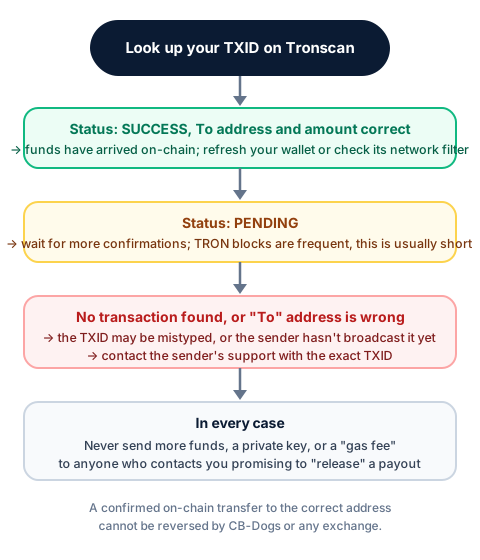
Work through this in order:
- Confirm you actually have a TXID to check. If a payout hasn't been sent yet on the sender's side, there's nothing to look up — check whether the sender has confirmed the transfer was sent before assuming a technical problem.
- Look up the TXID on Tronscan. If it shows success, with the correct "To" address and amount, the funds have genuinely arrived on-chain. At that point, check your wallet itself: make sure it's showing the TRC20 / TRON network (not filtered to a different one) and try refreshing or reopening the app — occasionally a wallet's displayed balance lags slightly behind the blockchain itself.
- If it shows pending, wait — this is normally short on TRON, and re-checking after a few minutes is usually enough.
- If no transaction is found, or the "To" address doesn't match yours, don't assume the funds are simply delayed. Contact the sender directly (for a CB-Dogs payout, that's CB-Dogs support) with the exact TXID and the address you registered, so the discrepancy can actually be investigated rather than guessed at.
How CB-Dogs payouts fit into this
Every CB-Dogs withdrawal is marked paid together with its transaction hash, and that TXID is published — alongside the amount, date, and a masked version of the recipient address — on our public payouts page. Each entry links directly to its Tronscan record, so you don't have to take our word for a payout: you can look up the exact transaction yourself, the same way this guide walks through.
Withdrawals follow the same underlying rules regardless: USDT paid only on TRC20, a 10 USDT minimum, a flat 3 USDT fee below 50 USDT and no fee at 50 USDT or above, and a 24-hour hold after you change your registered address. See forex rebates paid in USDT for the full payout process from credited cashback through to a TXID you can verify.
Frequently asked questions
Tronscan (tronscan.org) is the standard public block explorer for the TRON network. It lets anyone look up a transaction, wallet address, or block and see its details, independent of any single exchange or wallet provider.
Related reading
- How to set up a Trust Wallet for USDT (TRC20) payouts — creating a wallet and finding your receive address.
- How to send USDT (TRC20) from an exchange — sending funds and confirming arrival on Tronscan.
- TRC20 vs ERC20 vs BEP20 — why the network matters and how to tell address formats apart.
- USDT safety, scams, and address poisoning — verifying an address in full before you rely on it.
Ready to see it in practice? Browse our public payouts page for real TXIDs you can look up on Tronscan yourself, or register with CB-Dogs to start earning cashback you can verify the same way.
Risk warning: forex and CFD trading carries a high risk of losing money. Cashback does not offset trading losses. Nothing here is investment advice.
Related articles
Cashback on your XM trades — free, paid in USDT
Sign up free