XM Leverage Explained: Tiers, Margin Calls, and Stop-Out Level
XMTrading offers up to 1000:1 leverage on Standard, Micro, and KIWAMI accounts, automatically stepped down as your account equity grows, with a 500:1 cap on Zero accounts, a margin call warning at 50% margin level, and an automatic stop-out at 20%.
By CB-Dogs Editorial4 min read
Disclosure: CB-Dogs receives an advertising (referral) fee — sometimes called an IB commission — from brokers for accounts opened or linked through us, and returns part of it to you as cashback, the same model used by cashback and points sites. This does not change your trading costs.
On this page
Our general forex leverage and margin guide covers the underlying formulas — required margin, margin level, margin calls, and stop-outs — with illustrative, broker-agnostic numbers. This article applies those same concepts specifically to XMTrading's own published leverage tiers and thresholds.
Key takeaways
- XMTrading's maximum leverage is 1000:1 on Standard, Micro, and KIWAMI accounts, but it steps down automatically as your total account equity rises through four published tiers.
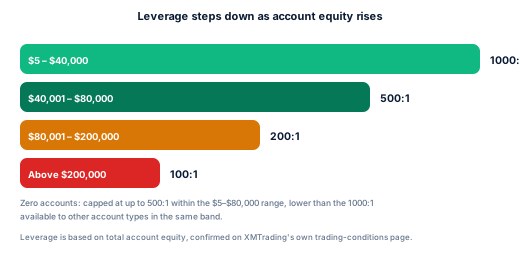
- Zero accounts are capped lower: up to 500:1 regardless of equity within the $5–$80,000 range, and lower again above that, following the same equity-based tiering as the other account types beyond that band.
- XMTrading states leverage stays the same even during high-impact news events — it doesn't automatically reduce leverage around scheduled announcements the way some brokers do.
- A margin call warning appears in MT4/MT5 once your margin level falls to 50% of required margin; XMTrading automatically closes positions (a stop-out) once it falls to 20%.
- You can change your account's leverage at any time from XMTrading's member area, and the change applies immediately — but only within the tier your current equity allows.
The short answer
XMTrading advertises a maximum of 1000:1 leverage, but that maximum only applies at the lowest end of an equity-based tier system — as your account's total equity grows, the maximum leverage available to it steps down automatically. Zero accounts sit on a separate, lower cap of 500:1 within the same lower equity band. Regardless of leverage, a margin call warning appears at 50% margin level and XMTrading automatically closes positions at 20% (the stop-out level) to protect against a negative balance.
XMTrading's leverage tiers (by total account equity)
| Total account equity | Maximum leverage (Standard / Micro / KIWAMI) |
|---|---|
| $5 – $40,000 | Up to 1000:1 |
| $40,001 – $80,000 | Up to 500:1 |
| $80,001 – $200,000 | Up to 200:1 |
| Above $200,000 | Up to 100:1 |
Zero accounts follow a separate rule: within the $5–$80,000 equity range, Zero's leverage can be set anywhere from 1:1 up to a maximum of 500:1 — never the 1000:1 available to the other three account types in the same range. XMTrading's own trading-conditions page doesn't spell out Zero's exact cap above $80,000 as a separate line, so treat the general tiers above as the likely pattern beyond that point rather than a confirmed figure for Zero specifically.
These tiers are based on your account's total equity, not your account type's advertised "up to 1000:1" headline in isolation — a well-funded account is automatically capped lower, regardless of which of the four account types it is (aside from Zero's separate, lower ceiling).
Leverage during high-impact news
XMTrading states its leverage "stays the same" through volatile, news-driven markets — it doesn't describe an automatic leverage reduction around scheduled high-impact economic releases the way some brokers apply. This doesn't mean risk is unchanged during news events: wider spreads, faster price movement, and potential slippage can all still affect you at unchanged leverage. It simply means the leverage ratio itself, per XMTrading's own statement, isn't the mechanism that changes.
Margin call and stop-out: the numbers that actually matter
Leverage gets most of the attention, but margin level is what actually determines whether your account is safe, in a warning state, or about to have positions closed. XMTrading's own trading-conditions page states both thresholds explicitly:
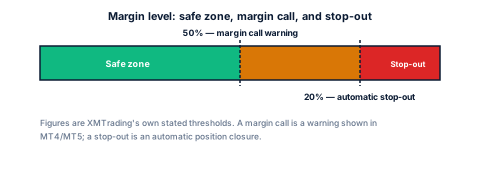
- Margin call warning: 50%. When your account's margin level (equity divided by used margin, as a percentage) falls to 50% of the required margin, a warning appears directly in the MT4/MT5 platform. This is a warning, not an automatic closure — XMTrading indicates you should act to avoid it going lower.
- Stop-out: 20%. If margin level continues falling to 20% of required margin, XMTrading automatically closes position(s) to protect the account balance from going further negative.
For the underlying formulas — how required margin and margin level are actually calculated, with worked examples — see our general forex leverage and margin explained guide; the mechanics are the same, only the specific 50%/20% thresholds above are XMTrading's own.
Changing your leverage
XMTrading lets you change your account's leverage at any time from the member portal (select the account, then choose the leverage-change option), and the new setting applies immediately — no waiting period or support ticket required, based on XMTrading's own help-centre description. The leverage you can choose is still bounded by your account's current equity tier from the table above; you can't select 1000:1 on an account whose equity has already crossed into a lower tier.
Frequently asked questions
Up to 1000:1 on Standard, Micro, and KIWAMI accounts, but only within the lowest equity tier (up to $40,000 in total account equity). Leverage steps down automatically as equity rises. Zero accounts are capped lower, at up to 500:1 within the $5-$80,000 range.
Related reading
- Forex leverage and margin explained — the general formulas and worked examples behind required margin and margin level.
- XM account types compared — see how Zero's lower leverage cap fits alongside its other differences.
- XM minimum deposit by account type — the funding side of building up the equity these tiers are based on.
- XM withdrawal: methods, times, and fees — how withdrawing funds can also change which equity tier you sit in.
- Is XM (XMTrading) legit? — XMTrading's regulatory status, relevant background for any leverage limit questions.
- XM broker page — current cashback rates by account type.
Risk warning: forex and CFD trading carries a high risk of losing money. Cashback does not offset trading losses. Nothing here is investment advice.
Related articles
Cashback on your XM trades — free, paid in USDT
Sign up free