How to Open an XM Account and Link It to Your Cashback
To earn CB-Dogs cashback on XMTrading, register with CB-Dogs and open your XMTrading account through our link before you fund or trade it, then verify your identity so trading activity can be tracked back to your CB-Dogs profile.
By CB-Dogs Editorial5 min read
Disclosure: CB-Dogs receives an advertising (referral) fee — sometimes called an IB commission — from brokers for accounts opened or linked through us, and returns part of it to you as cashback, the same model used by cashback and points sites. This does not change your trading costs.
On this page
- The short answer
- Step 1: Register with CB-Dogs first
- Step 2: Open your XMTrading account through the CB-Dogs link
- Step 3: Verify your identity and address
- Step 4: Fund your account and start trading
- Already have an XMTrading account? Use the additional-account path instead
- Common mistakes that break tracking
- Frequently asked questions
- Related reading
Our additional XM account guide covers what to do if you already hold an XMTrading account opened outside CB-Dogs. This article covers the other case: opening a brand-new XMTrading account the right way from the start, so your trading is tracked for cashback from your very first trade.
Key takeaways
- The order matters: register with CB-Dogs and click through our XMTrading link before you create your XMTrading profile, not after.
- XMTrading's own sign-up is three steps — register with an email, verify your identity and address, then fund and trade — and typically auto-creates a Standard account on MT5 at 1000:1 leverage in JPY unless you choose otherwise.
- You can hold up to eight live XMTrading accounts on one verified profile, which is what makes the 'additional account' path possible if you signed up before finding CB-Dogs.
- Cashback is only tracked on trading activity attributed to CB-Dogs' partner link — trades on an account opened directly with XMTrading, or through a different partner, aren't visible to us.
- Verification (ID and proof of address) has to be approved before you can fund and trade, so start it as soon as you register to avoid delays.
The short answer
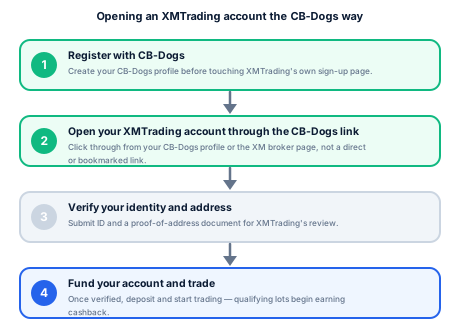
Register with CB-Dogs first, then open your XMTrading account by clicking through from your CB-Dogs profile (or our XMTrading link) rather than going to XMTrading directly. From there, XMTrading's own process is three steps — register, verify, trade — and once your profile is verified you can fund and start trading. Every closed lot on that account then qualifies for CB-Dogs cashback under the rate for whichever account type you chose.
Step 1: Register with CB-Dogs first
This is the step people skip, and it's the one that matters most. CB-Dogs can only track trading activity that XMTrading reports against our partner (IB) link — if your XMTrading account was opened directly, or through someone else's link, there's no way to retroactively attach it to CB-Dogs. Register with CB-Dogs before you touch XMTrading's own sign-up page.
Step 2: Open your XMTrading account through the CB-Dogs link
From your CB-Dogs profile, use the XMTrading link provided (or the "open an account" button on our XM broker page) rather than searching for XMTrading independently or reusing a bookmark from before you found CB-Dogs. On XMTrading's side, creating a profile just needs an email address. XMTrading's own default is to auto-generate your first real trading account as a Standard account on MT5, at 1000:1 leverage, denominated in JPY — if you want a different account type, base currency, or leverage from the start, look for that option during profile creation, or open an additional account afterward from XMTrading's member area (see XM account types compared to decide which one fits you).
Step 3: Verify your identity and address
XMTrading requires identity verification (a government-issued ID) and proof of residential address before your account can be funded and traded. This is standard know-your-customer (KYC) practice across regulated and licensed brokers, not something specific to CB-Dogs. Submit clear, current documents the first time to avoid a rejection-and-resubmission cycle — mismatched names, expired IDs, and address documents older than the usual three-to-six-month window are common reasons submissions bounce back.
Step 4: Fund your account and start trading
Once verified, you can deposit and place trades. XMTrading lists a $5 minimum deposit across account types (the practical minimum can be higher depending on your funding method — see our XM minimum deposit guide). From this point, every closed lot that qualifies under XMTrading's own trading rules and CB-Dogs' terms starts building toward cashback, credited after XMTrading reports the underlying commission to us. See how forex rebates work for the full mechanics of how that IB commission turns into your rebate.
Already have an XMTrading account? Use the additional-account path instead
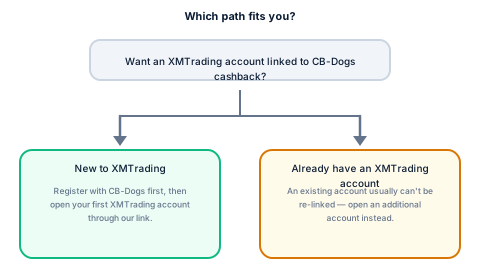
If you opened an XMTrading account before finding CB-Dogs — directly, or through a different partner — you generally can't move that existing account's tracking to CB-Dogs. XMTrading confirms you can hold up to eight live accounts under one verified profile, which is exactly what makes it possible to open a new, CB-Dogs-linked account without starting your verification over from scratch. Our dedicated additional XM account guide walks through that process step by step, including how to move funds between your existing and new accounts.
Common mistakes that break tracking
- Opening the XMTrading account before registering with CB-Dogs. Tracking depends on the click-through happening first; registering with CB-Dogs afterward doesn't retroactively attach an account you already opened.
- Clearing cookies or using a different browser/device between clicking the link and finishing sign-up. This can interrupt the referral tracking XMTrading uses to attribute your account to CB-Dogs' partner link. Complete registration in the same session where possible.
- Assuming a demo account counts. A demo account uses simulated funds and doesn't generate the IB commission that cashback is calculated from; see our demo vs. live accounts and forex cashback guide for the distinction.
- Confusing XMTrading's own account verification with CB-Dogs cashback approval. These are two separate processes run by two separate companies — being verified with XMTrading doesn't automatically mean your trading is visible in your CB-Dogs dashboard immediately, though it should appear once XMTrading reports your activity.
Frequently asked questions
Before. Register with CB-Dogs first and open your XMTrading account through the link on your CB-Dogs profile or our XM broker page, so the account is attributed to CB-Dogs' partner link from the start.
Related reading
- Opening an additional XM account — the dedicated path for readers who already have an XMTrading account.
- XM account types compared — decide which account type to pick before or right after you sign up.
- XM minimum deposit by account type — what you'll actually need to fund the account you just opened.
- Demo vs. live accounts and forex cashback — why only a live account generates cashback.
- How forex rebates work — the mechanics behind the rebate your new account starts earning.
- XM broker page — the account-opening link and current cashback rates by account type.
- How it works — how CB-Dogs is paid and what we share with you.
Risk warning: forex and CFD trading carries a high risk of losing money. Cashback does not offset trading losses. Nothing here is investment advice.
Related articles
Cashback on your XM trades — free, paid in USDT
Sign up free