How to Verify Your Rebate Volume From Your Trade History
How to read your broker's trade history or statement, sum your qualifying lot volume, and cross-check it against a cashback rebate report.
By CB-Dogs Editorial5 min read
Disclosure: CB-Dogs receives an advertising (referral) fee — sometimes called an IB commission — from brokers for accounts opened or linked through us, and returns part of it to you as cashback, the same model used by cashback and points sites. This does not change your trading costs.
On this page
A cashback provider tells you how many qualifying lots it counted for a period. Your broker's own trade history tells you what you actually traded. The only way to know those two numbers genuinely match — rather than just trusting a dashboard — is to read your own statement and add it up yourself. This guide walks through exactly which columns matter, how to sum them correctly, and the most common reasons a self-calculated total won't match a rebate report on the first try.
The short answer
Most rebate programs, including CB-Dogs, calculate cashback from qualifying closed lot volume for a given period — not from open positions, not from account balance, and not from profit or loss. To verify it yourself: export your trade history for the same period, sum the volume (lot size) column for every closed trade that meets the program's qualifying rules, and compare that total to the lot figure on your rebate statement.
Reading a trade history statement
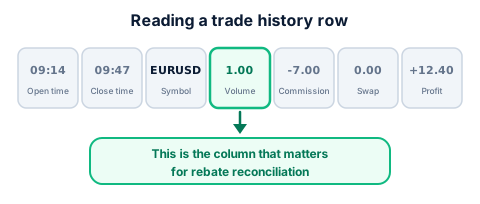
A typical closed-trade history export includes, per row:
- Open time / Close time — when the position was opened and closed. The gap between them is what a minimum holding-time rule (covered in our guide for scalpers) is checking.
- Symbol — the instrument traded (EUR/USD, XAU/USD, etc.). Some programs exclude specific instruments from rebate eligibility; check your provider's terms.
- Volume (lots) — the position size, usually shown as a decimal (1.00 = one standard lot, 0.10 = one mini lot). This is the column that matters most for rebate reconciliation.
- Commission / Swap — separate cost line items, not rebate-relevant on their own, but useful for cross-checking against our round turn vs. per side guide if you're also reconciling total trading cost.
- Profit — the trade's realized P&L. This has no bearing on rebate eligibility, which is volume-based, not profit-based.
The reconciliation process
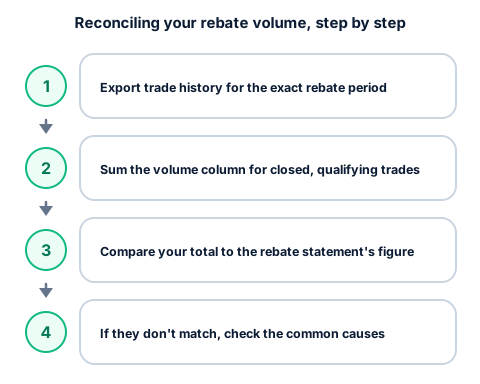
- Export your trade history for the exact period your rebate statement covers, filtered to closed trades on the account linked to your rebate program.
- Sum the volume column, applying any qualifying rules that apply to your program (for example, excluding trades below a minimum holding-time threshold, or excluding specific instruments if your terms say so).
- Compare your total to the qualifying-lots figure shown on your rebate statement or dashboard for the same period.
- If the numbers don't match, check the common causes below before assuming an error — most mismatches trace back to a filtering difference, not a calculation mistake on either side.
A worked reconciliation example (illustrative numbers)
Say your rebate statement for a given month shows 42.5 qualifying lots. You export your trade history for the same month and find 61 closed trades. Summing the volume column across all 61 gives 48.0 lots — a 5.5-lot gap worth investigating before assuming either side is wrong.
Working through the common causes: three of those trades, totalling 2.0 lots, were closed in under the program's stated minimum holding-time threshold, so they're correctly excluded. Two more trades, totalling 3.5 lots, were placed the day before your account finished linking to the rebate program, so they predate eligibility and are also correctly excluded. That accounts for the full 5.5-lot gap: 48.0 − 2.0 − 3.5 = 42.5 lots, matching the statement exactly.
This is the kind of gap that looks alarming as a single number ("5.5 lots missing!") but resolves cleanly once you check it against the actual qualifying rules line by line, rather than assuming a mismatch means an error.
All figures above are rounded, hypothetical inputs used to demonstrate the reconciliation process — not a real statement or a specific program's actual monthly totals.
Common reasons the numbers don't match on the first try
- Open positions counted by mistake. Only closed volume counts toward a rebate for a given period; a still-open position's lot size isn't included until it closes.
- Partial closes split across rows. A single 1.0-lot position closed in two 0.5-lot pieces may appear as two rows in your history — make sure you're summing all of them, not just the first.
- Hedged positions. Some platforms show a buy and a matching sell on the same symbol as two separate closed trades, each with its own volume — whether both legs count depends on your specific program's and broker's terms, so check rather than assume.
- Date-range or time-zone mismatch. Your platform's server time may differ from the reporting period your rebate provider uses (for example, a period ending at broker server midnight vs. UTC midnight) — a handful of trades near the boundary can land in the "wrong" period on one side.
- A qualifying rule excluded some trades. A minimum holding-time rule, an excluded-instrument list, or an account-linking timing issue (trades placed before your account finished linking to the program) can all legitimately reduce the qualifying total below your raw traded volume.
Why this matters even with a provider you trust
Our guide to verifying a forex cashback provider is legitimate covers signs of trustworthiness at the provider level — transparent terms, a real payout history, responsive support. This guide is the complementary, trade-level check: it doesn't require trusting anyone's word, because both numbers (your own trade history and the rebate report) come from data you can independently pull and compare yourself. Keeping your own running log, as covered in our guide to keeping records of forex rebates, makes this reconciliation faster each time, since you're comparing against your own running total rather than starting from zero every period.
Frequently asked questions
Generally, closed trading volume (lots) on qualifying instruments and account types, for the reporting period in question — not open positions, account balance, or profit and loss. Check your specific program's terms for any exclusions.
Check your own numbers
Export your trade history for your most recent rebate period and try the reconciliation steps above. If you're a CB-Dogs member and something doesn't add up, our support team can review your statement with you — or, if you haven't registered yet, see the cashback calculator and register with CB-Dogs to start tracking your own qualifying volume.
Risk warning: forex and CFD trading carries a high risk of losing money. Cashback does not offset trading losses. Nothing here is investment advice.