Exness Partner Change: How to Switch an Existing Account to a New IB
Exness lets an existing client request a partner (IB) change from their own Personal Area — confirming it with a code sent to their registered contact details — and the change is reported to take roughly 3 business days, without opening a new account or changing the account number, balance, or trading conditions.
By CB-Dogs Editorial7 min read
Disclosure: CB-Dogs receives an advertising (referral) fee — sometimes called an IB commission — from brokers for accounts opened or linked through us, and returns part of it to you as cashback, the same model used by cashback and points sites. This does not change your trading costs.
On this page
- What a partner change actually is
- The general request flow in the Exness Personal Area
- What changes and what doesn't
- Partner change vs. registering a fresh account
- How to link your account to CB-Dogs after the change
- Contrast: on XM, an existing account generally can't be moved
- Frequently asked questions
- Related reading
If you already have an Exness trading account — opened directly, or through a link that wasn't ours — you don't need to close it or open a new one to start earning CB-Dogs cashback on it. Exness offers a partner change (sometimes called partner switching) that re-assigns which Introducing Broker (IB) your existing account is tracked under. This guide covers who this applies to, how the request generally works, what changes and what doesn't, and how it compares to XM, where the same move isn't available.
This matters because CB-Dogs — like any IB — can only credit cashback on trading that Exness actually reports against our own partner relationship. If your account is currently attributed to no partner, or to a partner other than CB-Dogs, none of your trading counts toward our rebate, regardless of how much you trade or for how long. A partner change is the mechanism that fixes that for an account you already have, rather than requiring you to abandon it.
Key takeaways
- An Exness partner change re-assigns which IB (partner) your existing account is tracked under, without closing the account or opening a new one.
- You request it from your own Exness Personal Area and confirm it with a code sent to your registered email or phone; Exness is reported to process the change in around 3 business days.
- Your account number, balance, open positions, and trading conditions stay exactly the same — only the partner attribution changes, which is what determines who gets paid an advertising (IB) fee on your trading.
- Once the change goes through, you still need to submit your Exness account number in your CB-Dogs account so we can start crediting cashback on it.
- This is an Exness-specific option: on XM, an existing account generally can't be reassigned to a different partner — the workaround there is opening an additional account instead.
What a partner change actually is
Every Exness trading account is attributed to exactly one partner (IB) at a time. That attribution is what determines who receives the advertising fee Exness pays on your trading — it has nothing to do with your spreads, commissions, or account terms. A partner change is simply a request to move that attribution from your current partner (which might be "no partner," if you opened directly) to a different one.
This is different from opening a brand-new account. You keep the same account number, the same trading history, and the same balance — only the record of which partner is credited for your future trading activity changes.
It's also worth being clear about what a partner change is not: it isn't a way to get a better spread, a different leverage cap, or any change to your account's trading conditions. CB-Dogs operates as a registered Exness partner and pays cashback based on the commission Exness reports to us once your account is attributed to our partnership — the partner change is the step that establishes that attribution for an account you already opened.
The general request flow in the Exness Personal Area
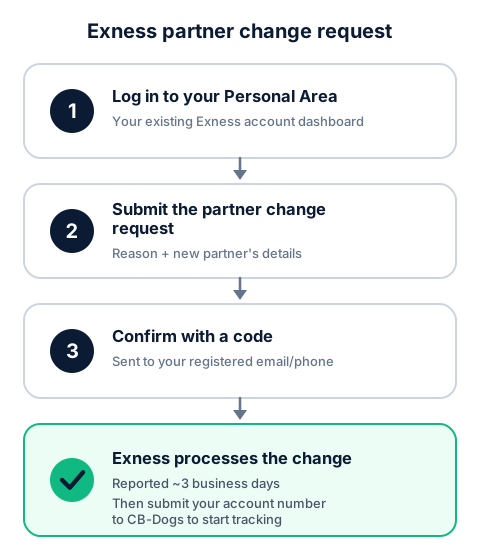
Based on Exness's own partner-change process as described in its account-management materials, the request generally follows this shape:
- Log in to your Exness Personal Area — the account dashboard for your existing trading account, not the separate Partner Personal Area used by IBs.
- Find the partner change (or "change partner") request option, typically under account or profile settings. You'll usually be asked for a reason for the change and the new partner's details (for CB-Dogs, that's our partner link or reward-wallet identifier — contact us if you need this).
- Confirm the request with a verification code sent to your registered email or phone number on file with Exness. This step exists specifically so a partner change can't be requested by someone other than the account owner.
- Wait for Exness to process the change — reported to take around 3 business days.
Keep your Personal Area's verification (identity documents, contact details) fully up to date before submitting the request — an unverified profile is a common reason a request stalls or gets sent back for more information.
What changes and what doesn't
| Stays exactly the same | Changes |
|---|---|
| Account number | Which partner (IB) is attributed to your account |
| Account balance and open positions | Who receives the advertising fee on your future trading |
| Trading conditions (spreads, leverage, instruments) | Whose cashback program your future trading can count toward |
| Trading history | — |
Partner change vs. registering a fresh account
If you're early enough that you haven't traded much yet, it's worth weighing the two options rather than defaulting to a partner change:
- Partner change keeps your existing account number, balance, and trading history intact, but depends on Exness processing a request that takes a few business days and requires your Personal Area to already be fully verified.
- A fresh account opened through CB-Dogs' own link is attributed to our partnership immediately, with no request or waiting period — but it means starting a new account from zero, with none of your existing trading history, deposits, or balance carried over.
Neither option is universally better: if your existing account has meaningful history, an active balance, or open positions you don't want to disturb, a partner change is usually the more practical route despite the short wait. If the account is new or largely unused, opening a fresh one through our link can be simpler than waiting on a request.
How to link your account to CB-Dogs after the change
A processed partner change moves your account's attribution to CB-Dogs' partner relationship, but it doesn't automatically appear in your CB-Dogs account on its own — you still need to tell us which account it is.
- If you haven't already, register with CB-Dogs.
- Go to your linked accounts page and submit your Exness account number.
- If your submission initially shows as not yet linked, that usually just means Exness's own report to us hasn't caught up with the partner change yet rather than something being wrong — it typically resolves automatically within our next regular check once the change is fully processed on Exness's side.
From that point, every qualifying closed lot under the new attribution starts counting toward cashback the same way it would on a brand-new account. See how forex rebates work for the underlying commission mechanics, and use the cashback calculator to estimate what your trading volume could earn. If your Exness account is currently opened through no partner at all, or you'd rather register a fresh account than wait on a partner change, our step-by-step guide to opening an Exness account and linking cashback covers that path instead.
Contrast: on XM, an existing account generally can't be moved
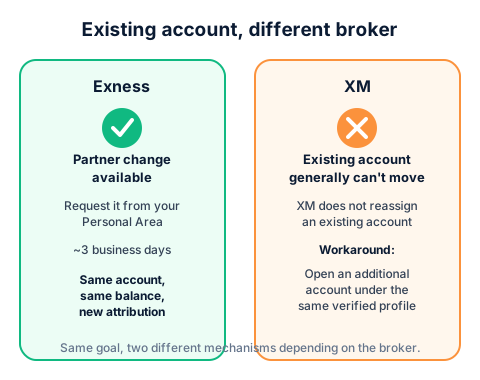
Exness's partner change is a genuine account-level reassignment: the same account, under a new partner. XM works differently. In most cases, XM does not move an existing account to a different partner, and CB-Dogs can't change that assignment on our side either. If your XM account was opened directly or through another partner's link, it will keep earning that other partner's commission — not ours — no matter how long you wait.
The XM workaround is to open an additional account under your same verified XM profile and link that new account to CB-Dogs instead, while keeping your existing account exactly as it is. See our guide to opening an additional XM account for the exact steps. If you're deciding between the two brokers generally, our Exness vs. XM comparison covers the broader differences beyond this one mechanism.
Frequently asked questions
It's reported to take around 3 business days from request to processing, based on Exness's own account-management materials — treat this as an estimate rather than a guarantee, since Exness can change its own processing times.
Related reading
- How to open an Exness account and link it to your cashback — the path for a brand-new account instead of an existing one.
- Exness vs. XM: which is better? — a broader comparison beyond partner-change mechanics.
- Opening an additional XM account — the XM equivalent workaround for an account that can't be reassigned.
- How forex rebates work — how a partner (IB) commission turns into your cashback once your account is linked.
- Exness withdrawal: methods, times and fees — a separate process from CB-Dogs cashback, covering your own Exness trading balance.
Risk warning: forex and CFD trading carries a high risk of losing money. Cashback does not offset trading losses. Nothing here is investment advice.
Related articles
Cashback on your XM trades — free, paid in USDT
Sign up free