MT4 vs MT5 for Tracking Your Trading Volume and Costs
MT4 and MT5 record the same trades but at different levels of detail: MT5 separates orders, deals, and positions with per-deal commission and swap fields, while MT4 often summarizes totals on one row, which changes reconciliation effort but not how cashback is calculated.
By CB-Dogs Editorial4 min read
Disclosure: CB-Dogs receives an advertising (referral) fee — sometimes called an IB commission — from brokers for accounts opened or linked through us, and returns part of it to you as cashback, the same model used by cashback and points sites. This does not change your trading costs.
On this page
If your broker offers both MetaTrader 4 and MetaTrader 5, the choice between them isn't just about the interface. The two platforms record and display your trading history differently, and that difference matters the moment you try to reconcile your own closed-lot volume, your spread and commission costs, or a rebate statement against what your terminal shows you. This guide compares how MT4 and MT5 report costs and volume, not which platform is "better" for trading itself.
Key takeaways
- MT5 separates orders, deals, and positions into distinct tabs, while MT4 often summarizes commission and swap at the trade-row level
- MT4 accounts always run in hedging mode; MT5 can run in hedging or netting mode, which changes how open positions are displayed but not the underlying deal history
- Neither platform shows spread as its own line item — it is calculated from the difference between entry price and the quoted price
- Cashback is calculated from qualifying closed lot volume on the linked broker account, regardless of whether MT4 or MT5 was used
- Exporting the full deal history, rather than relying on a summary screen, gives the most accurate figures for reconciling costs or rebate volume
The core difference: what each platform logs
Both platforms log every executed trade, but the level of detail differs:
- MT4 uses a single "Orders" or "Account History" tab. Commission and swap are usually shown as columns on the trade row, but older or default report layouts sometimes summarize totals rather than breaking out every component per trade, and MT4 has no separate "deals" concept distinct from orders.
- MT5 separates orders, deals, and positions into distinct tabs. A single position can be built from several partial-fill deals, and each deal carries its own commission and swap fields. This finer granularity is useful if you're trying to reconcile partial closes or scale-in/scale-out trades against a cashback statement, since each deal is its own line.
- MT5's reports also support more account types natively — netting and hedging, multiple base currencies, and in some broker setups, multi-asset instruments beyond forex/CFDs — which can change how volume is grouped depending on your account's settings.
None of this changes what actually happened in the market. It changes how much work you have to do to add it up correctly.
Netting vs. hedging: why your "open positions" count can differ
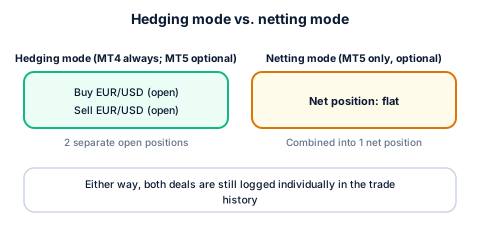
MT4 accounts always run in hedging mode: a buy and a sell on the same instrument can sit open at the same time as two separate positions. MT5 accounts can run in hedging mode or netting mode, where an opposite trade on the same instrument reduces or closes the existing position instead of opening a second one.
This affects how many "open positions" you see at any moment, and it's the same mechanical distinction covered in our hedging and rebate eligibility guide — but it does not change the underlying deal history. Every execution is still logged as its own deal with its own volume, price, commission, and swap, whether your account nets positions together for display purposes or not. If you're reconciling volume, work from the deal-level export, not from the "current open positions" count.
Reading spread, commission, and swap on each platform
The formulas don't change between platforms — see our lot, pip, and spread cost guide and swap and overnight fee guide for the underlying math. What changes is where to find the inputs:
- Spread isn't a separate line item on either platform's history — it's built into the difference between your entry price and the quoted price at that instant. Neither MT4 nor MT5 shows "spread cost" as its own column; you calculate it from the price data using the standard formula.
- Commission appears as its own field on both platforms, but MT5's per-deal breakdown makes it easier to confirm whether a broker charges it per side or round-turn (see our round-turn vs. per-side guide) when a position was built or closed across multiple partial deals.
- Swap posts at the platform's daily rollover time regardless of MT4 or MT5, and both show it as a per-position or per-deal field — but MT5's finer deal granularity can make it clearer exactly which night(s) a swap charge applied to a position that was partially closed and partially held open.
A worked example (illustrative)
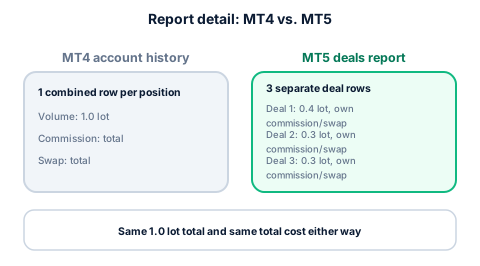
Suppose a trader closes a EUR/USD position in three partial deals over a session: 0.4 lots, 0.3 lots, and 0.3 lots, for 1.0 lot total. On MT4's classic report, this might show as one combined row with a single commission total. On MT5, it typically shows as three separate deal rows, each with its own commission field, that sum to the same 1.0 lot and the same total commission. Both are internally consistent — they just require different amounts of addition to arrive at the same qualifying volume figure. These numbers are a round, illustrative example, not a specific broker's report format.
Does the platform affect your cashback?
No. CB-Dogs calculates cashback from the broker's own back-end trade report for your linked account, based on qualifying closed lot volume — see how forex rebates work for the full mechanics. MT4 vs. MT5 is a question of how easily you can read and verify your own numbers, not a factor in how much cashback you earn on the same trading activity. If you want to double-check your own volume against a cashback statement, our guide to verifying rebate volume from trade history covers the reconciliation steps in more detail, on either platform.
Frequently asked questions
No. Cashback is calculated from your qualifying closed lot volume on your linked broker account, not from which trading platform you used to place the trades.
Keep your own records straight
Whichever platform you trade on, exporting your full deal history regularly makes it much easier to catch a reconciliation mismatch early. Use the cashback calculator to estimate rebates on your typical monthly volume, or register with CB-Dogs to start tracking your own qualifying trades.
Risk warning: forex and CFD trading carries a high risk of losing money. Cashback does not offset trading losses. Nothing here is investment advice.
Related articles
Cashback on your XM trades — free, paid in USDT
Sign up free