XM Zero Account Review: Spreads, Commission, and Real Cost Per Lot
XMTrading's Zero account pairs a near-zero spread with a disclosed commission of $10 per $100,000 traded (round turn), capped at 500:1 leverage — whether that beats a spread-only account depends on the actual spread gap at the moment you trade, not on a fixed rule.
By CB-Dogs Editorial8 min read
Disclosure: CB-Dogs receives an advertising (referral) fee — sometimes called an IB commission — from brokers for accounts opened or linked through us, and returns part of it to you as cashback, the same model used by cashback and points sites. This does not change your trading costs.
On this page
- XM Zero account at a glance
- How the Zero account commission actually works
- All-in cost per lot: Zero vs. Standard vs. KIWAMI (a worked hypothetical example)
- How cashback changes the math on a Zero account
- Who should choose XM Zero — and who shouldn't
- How to open (or add) an XM Zero account and link your cashback
- Frequently asked questions
- Related reading
Our XM account types comparison covers all four XMTrading account types side by side. This article goes deeper on just one of them: the Zero account — how its commission actually works, what it costs per lot compared with Standard and KIWAMI once you add spread and commission together, and who it's actually built for.
Key takeaways
- XMTrading's Zero account charges a disclosed commission of $10 per $100,000 traded (round turn) on top of a spread that starts from 0 pips — that's the trade-off for a much tighter headline spread than Standard, Micro, or KIWAMI.
- Whether Zero is cheaper than a spread-only account depends on the actual spread gap at the moment you trade versus that commission — it isn't cheaper by default, and trading more lots doesn't change which side wins.
- Zero's maximum leverage is capped at 500:1, versus 1000:1 on Standard, Micro, and KIWAMI, and Zero isn't eligible for XMTrading's deposit bonus.
- Zero suits traders who want to see spread and commission itemized separately and who trade frequently enough that a tight raw-style spread outweighs the added commission line — not every trading style.
- Your CB-Dogs cashback rate is set per account type, so switching between Zero, Standard, and KIWAMI changes both your trading cost and your rebate — see the live rates below.
XM Zero account at a glance
| Item | Zero account |
|---|---|
| Minimum spread | From 0 pips |
| Commission | $10 per $100,000 traded, round turn |
| Maximum leverage | 500:1 (tiered down as account equity grows; up to 500:1 within the $5–$80,000 equity range) |
| Minimum deposit | $5 |
| Minimum trade size | 0.01 lot |
| Instrument groups | 6 of XMTrading's 8 groups (no crypto derivatives, no thematic indices) |
| Base currency | USD, EUR, or JPY |
| Deposit bonus | Not eligible |
| Swap-free option | Not listed for Zero — KIWAMI is the only type XMTrading confirms as swap-free, and only on specific instruments |
| Hedging | Allowed |
| Platforms | MT4 and MT5 |
Minimum trade size, hedging, and the leverage-tier detail above come from XMTrading's own trading-conditions page for Zero; every other row matches the account-types comparison in our XM account types guide.
How the Zero account commission actually works
Zero's cost is split into two visible pieces instead of one: a spread that XMTrading publishes as starting from 0 pips, plus a separate commission of $10 per $100,000 traded, round turn — meaning that $10 figure already covers both opening and closing the position together, not $10 on each side.
Where it gets platform-specific is when that commission leaves your account. On MT4, the full round-turn commission is deducted in one line at the moment you open the trade. On MT5, it's split in two: a portion deducted when you open the position, and the rest deducted when you close it. The total you pay is the same either way — only the timing on your statement differs, which matters if you're reconciling a MT4 vs. MT5 trade history against expected costs (our MT4 vs. MT5 for tracking volume and costs guide covers that reconciliation in more depth).
Because the commission is quoted per $100,000 of notional traded rather than per lot directly, the dollar amount per standard lot shifts slightly with the pair and the exchange rate — a lot on a pair quoted in a non-USD base currency converts differently than a lot on a USD-quoted pair. As a rough, illustrative anchor: on a pair where a standard lot's notional value sits close to $100,000, that works out to roughly $10 round turn per standard lot before any spread. For the exact mechanics on non-USD-quoted pairs, see our guide on how brokers calculate commission on non-USD accounts, and check the commission line on your own trade history for the precise figure.
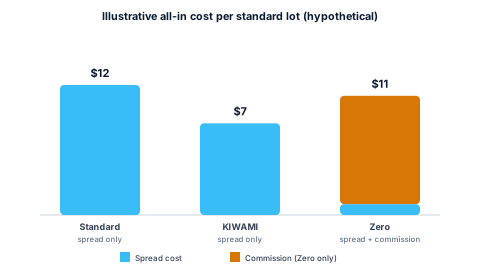
All-in cost per lot: Zero vs. Standard vs. KIWAMI (a worked hypothetical example)
Comparing Zero against a spread-only account isn't a matter of "commission accounts are cheaper" or "commission accounts are more expensive" — it's a break-even question, covered in full in our raw spread vs. standard account guide. The short version, adapted to three accounts instead of two:
All-in cost per lot = (Spread in pips × Pip value per lot) + Commission per lot
Using clearly hypothetical, rounded numbers on a pair where pip value is $10 per standard lot — not a live quote for any account type:
| Account | Spread (hypothetical) | Spread cost | Commission | All-in cost per lot |
|---|---|---|---|---|
| Standard | 1.2 pips | $12.00 | $0 | $12.00 |
| KIWAMI | 0.7 pip | $7.00 | $0 | $7.00 |
| Zero | 0.1 pip | $1.00 | ~$10.00 | $11.00 |
In this illustrative example, KIWAMI comes out cheapest, Zero sits close behind it, and Standard is the most expensive of the three — but that ranking exists only because of the specific hypothetical spreads plugged in above. Change the actual spread each account type quotes at the moment you trade — which shifts constantly with the pair, the session, and market conditions — and the ranking can flip entirely. A Zero account only beats a spread-only account when its spread saving (in pips) is larger than the commission converted into pips; the full formula and two worked examples for running this yourself are in the raw-spread-vs-standard guide linked above.
How cashback changes the math on a Zero account
Every number above is the raw trading cost, before cashback. CB-Dogs pays a per-lot cashback rate that's set independently for each XMTrading account type, funded from the advertising (IB referral) fee XMTrading pays us — it isn't a discount on the commission itself, and it doesn't change what XMTrading deducts from your account. What it does is return part of your trading cost afterward, in USDT on the TRON network (TRC20 only), which effectively lowers your net cost per lot regardless of which account type you're comparing.
| Account type | Rebate / lot (USDT) |
|---|---|
| StandardSpread-based account, no commission. | 9.0 |
| MicroRebate is calculated per 100,000 units of micro-lot volume (i.e. the same per-lot rate as Standard, scaled to micro-lot size). | 9.0 |
| KiwamiXM's tightened-spread account tier available in select regions. | 6.0 |
| ZeroCommission-based account. Rebate is paid in addition to the raw spread — commission you pay is unaffected. | 4.5 |
Provisional rate
Because the cashback rate itself differs by account type, it's worth running your own numbers with the cashback calculator rather than assuming Zero's lower headline spread automatically means the best net outcome — a higher per-lot rate on a different account type can outweigh a small raw-cost saving, depending on your volume and trading style.
Who should choose XM Zero — and who shouldn't
Zero fits a fairly specific profile rather than being a universal upgrade:
- Scalpers and high-frequency traders who care about the tightest possible spread at entry and exit, and who trade enough volume that the itemized commission is worth tracking separately rather than folded into a wider spread.
- EA and algo traders whose strategies were built or backtested around a near-zero spread plus a fixed, predictable commission — since that combination is easier to model precisely than a variable spread that has no separate commission line.
- Traders who want to audit costs line by line, rather than trust that a wider spread is "fair" — Zero's disclosed commission makes the cost structure fully transparent, trade by trade.
Zero is less likely to suit:
- Traders who value the deposit bonus — Zero isn't eligible for it, where Standard and Micro are.
- Lower-frequency or casual traders — if you're not trading often enough for the tighter spread to outweigh a flat per-trade commission, a spread-only account can work out simpler and just as cheap, per the worked example above.
- Traders who want the widest instrument selection — Zero's instrument list is the narrowest of the four account types, with no crypto derivatives and no thematic indices.
- Traders who need higher leverage headroom — Zero caps out at 500:1, against 1000:1 on Standard, Micro, and KIWAMI; see our XM leverage explained guide for how the tiers work.
None of this is trading advice, and no account type changes your odds of winning a trade — it only changes your cost structure and, through that, your break-even point.
How to open (or add) an XM Zero account and link your cashback
If you don't have an XMTrading account yet, register with CB-Dogs first so your trading is tracked from the start, then follow our step-by-step guide to opening an XM account and linking cashback and select Zero as your account type during setup.
If you already have an XMTrading account under a different account type, note that XMTrading doesn't let you convert an existing account from one type to another — Standard can't become Zero after the fact. Instead, you open an additional account with the type you want under the same verified profile (up to eight live accounts total). See our guide to opening an additional XM account for the exact steps, including how to make sure the new Zero account is linked to your CB-Dogs cashback rather than left untracked.
Frequently asked questions
XMTrading's own site lists it as $10 per $100,000 traded, round turn — meaning that figure already covers both opening and closing the position. On MT4 it's deducted in one line at trade open; on MT5 it's split between open and close.
Related reading
- XM account types compared — the full four-way comparison across Standard, Micro, KIWAMI, and Zero.
- Raw spread vs. standard account: which is cheaper? — the general break-even formula this article's worked example is based on.
- XM minimum deposit by account type — the full funding-method breakdown behind the $5 figure above.
- XM leverage explained — how the equity-based leverage tiers and Zero's lower 500:1 cap work.
- Commission per lot: round turn vs. per side explained — the distinction behind Zero's $10-per-$100,000 figure.
- How brokers calculate commission on non-USD accounts — why the per-lot dollar figure can shift slightly by pair.
- XM broker page — live cashback rates and hold-period details for every account type.
Risk warning: forex and CFD trading carries a high risk of losing money. Cashback does not offset trading losses. Nothing here is investment advice.
Related articles
Cashback on your XM trades — free, paid in USDT
Sign up free