A Forex Trading Journal Template That Tracks Costs and Rebates
A cost-and-rebate-aware trading journal adds columns for spread, commission, swap, and rebate alongside gross profit/loss, so net-of-rebate result equals gross P/L minus total trading cost plus cashback received.
By CB-Dogs Editorial4 min read
Disclosure: CB-Dogs receives an advertising (referral) fee — sometimes called an IB commission — from brokers for accounts opened or linked through us, and returns part of it to you as cashback, the same model used by cashback and points sites. This does not change your trading costs.
On this page
Most trading journal templates track entries, exits, and profit or loss. Very few also track what each trade actually cost to place, or what came back afterward as cashback — which means most traders have no easy way to answer a simple question: was this trade profitable after costs and rebates, or only before them? This guide walks through a column layout that captures both sides, plus how to fill it in from records you already have.
Key takeaways
- A standard P/L journal hides spread, commission, and swap costs even though they're already baked into the reported profit or loss
- Key added columns are spread cost, commission, swap, net cost, rebate earned, and net-of-rebate result
- Rebates are usually credited on a periodic (weekly or monthly) basis rather than per trade, so a period rollup row is more practical than per-trade attribution
- Net-of-rebate result equals gross P/L minus total trading cost (spread + commission + swap) plus rebate earned
- Demo accounts don't generate cashback, so the rebate columns stay at zero on a demo journal
Why a standard P/L journal isn't enough
A trade's raw profit or loss already has spread, commission, and swap baked into it — but baked in isn't the same as visible. Two trades with identical gross P/L can have very different net-of-cost results if one had a much wider effective spread or a heavier swap charge. And neither number tells you what actually landed in your pocket if part of the cost was returned afterward as cashback, which is calculated separately by the rebate program rather than showing up in your broker statement at all — see how forex rebates work for why the two systems are separate.
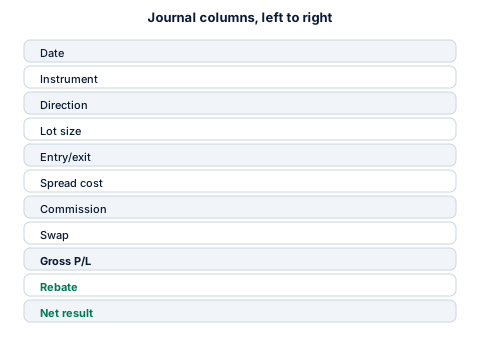
The columns below make each of those pieces visible on their own:
| Column | What it captures |
|---|---|
| Date / time | Open and close timestamps |
| Instrument | e.g. EUR/USD, XAU/USD |
| Direction | Buy or sell |
| Lot size | Closed volume for this trade |
| Entry / exit price | From your trade history export |
| Spread cost | Spread (pips) × pip value × lots, at entry — see the lot, pip, and spread guide |
| Commission | Per your broker's fee schedule, round-turn or per-side |
| Swap | If held past rollover — see the swap and overnight fee guide |
| Gross P/L | As reported by your broker |
| Net cost | Spread + commission + swap for this trade |
| Rebate earned | From your cashback statement, matched by trade or by period |
| Net-of-rebate result | Gross P/L − net cost + rebate |
Filling it in without a dedicated cost report
Most brokers don't hand you a "spread cost" figure directly — you calculate it from the entry price and the quoted spread at that moment using the pip-value formula. Commission and swap, by contrast, are usually already itemized in your trade history export, which our guide to reading trade history covers in more detail (including MT4/MT5-style reports — see the MT4 vs. MT5 comparison if the column layout looks unfamiliar).
Rebates typically don't arrive per-trade in real time; most cashback programs, including CB-Dogs, calculate and credit cashback on a periodic basis from qualifying closed volume. That means the cleanest way to journal rebates is usually a period rollup (weekly or monthly) rather than trying to attribute one rebate amount to one specific trade line.
A worked example (illustrative)
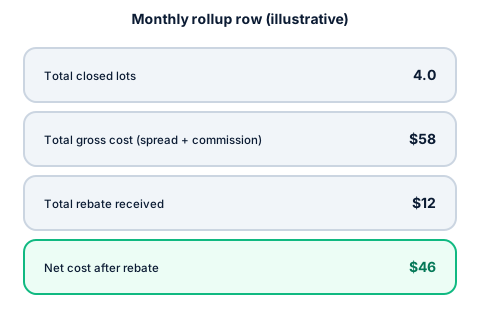
Suppose a trader's journal for one week shows three closed trades totalling 4.0 lots, with combined spread and commission cost of $58 and no swap (all closed same-day). That week's rebate statement shows $12 credited for the same volume. The net-of-rebate cost for the week is $58 − $12 = $46, regardless of how the individual trades performed directionally. If the three trades' combined gross P/L was +$120, the net-of-cost-and-rebate result is $120 − $46 = $74 rather than the $120 the raw P/L figure alone would suggest. These figures are a round, illustrative example, not a real account or a quoted CB-Dogs rate.
Keep it simple, keep it consistent
The most common failure mode isn't a wrong formula — it's an abandoned journal. A shorter template you actually update after every session beats an elaborate one you stop maintaining after a week. Start with the columns above, add fields only when you find yourself wanting them, and reconcile your rebate rollup against your actual cashback statement periodically rather than estimating it. If taxes are also part of why you're keeping records, our guide to keeping rebate records for taxes covers what else to retain.
Frequently asked questions
No. A spreadsheet with the columns described above is enough for most traders. The key is which fields you track, not the tool you track them in.
Start your own rollup
Once you're tracking net cost per period, the cashback calculator can help you sanity-check what a given month's volume should produce in rebates, and registering with CB-Dogs gives you an actual statement to reconcile your journal against.
Risk warning: forex and CFD trading carries a high risk of losing money. Cashback does not offset trading losses. Nothing here is investment advice.
Related articles
Cashback on your XM trades — free, paid in USDT
Sign up free