How to Read a Forex Trade Confirmation and Account Statement
A trade confirmation records one executed order (symbol, size, price, time); an account statement lists your full trade history plus running balance, equity, and margin — together they're the source of truth for reconciling your real spread, commission, swap, and cashback-qualifying volume.
By CB-Dogs Editorial6 min read
Disclosure: CB-Dogs receives an advertising (referral) fee — sometimes called an IB commission — from brokers for accounts opened or linked through us, and returns part of it to you as cashback, the same model used by cashback and points sites. This does not change your trading costs.
On this page
Most beginners open their trading platform's history tab, see a wall of numbers and abbreviations, and either ignore it entirely or trust it without really understanding it. That's a mistake, because your trade confirmation and account statement are the only records that show what you actually paid in spread, commission, and swap — not what a marketing page claims your broker charges. This article walks through the common fields, what each one means, and how to turn them into a real cost figure.
Key takeaways
- A trade confirmation records one executed order: symbol, direction, size, open and close price, and time. An account statement is the fuller picture — every trade plus running balance, equity, and margin figures.
- Spread doesn't appear as its own line item on either document — it's embedded in the gap between your open price and the quoted price at that moment, which you calculate yourself.
- Commission and swap almost always appear as their own separate columns, usually per closed trade (or per night held, for swap).
- Balance is your account's cash figure after closed trades; equity is balance adjusted for any currently open, unrealized profit or loss — the two are only equal when nothing is open.
- Your account statement, not a rebate provider's dashboard, is the authoritative source for your own qualifying trading volume if you ever need to double-check a cashback calculation.
The short answer
A trade confirmation is the record of a single executed order — what you bought or sold, how much, at what price, and when. An account statement is the broader document: your full trade history over a period, plus account-level figures like balance, equity, margin, and free margin at any point in time. Field names and exact layout vary by broker and platform, but the underlying concepts are consistent across almost every retail forex and CFD provider.
Trade confirmation fields, one by one
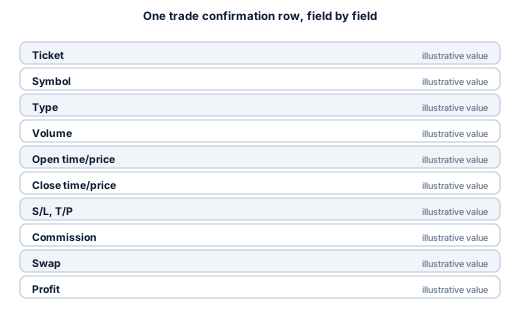
- Ticket / order ID. A unique reference number for that specific order, used to look it up again or reference it in a support ticket.
- Symbol. The instrument traded (for example, a currency pair or gold).
- Type. Buy or sell, and sometimes the order type (market, limit, stop) — covered in more depth in our order types and cost implications guide.
- Volume / lots. The position size, in lots, as covered in our lot, pip, and spread cost guide.
- Open time and open price, close time and close price. When and at what price the position was opened and closed. The gap between your open price and the market's quoted price at that instant is where the spread cost is actually embedded — it is not shown as its own column on most platforms.
- Stop-loss / take-profit. The price levels attached to the order, if any, as covered in our stop-loss types guide.
- Commission. A separate fee charged on the trade, common on raw-spread or ECN-style accounts, as covered in our commission per lot guide.
- Swap. Overnight financing charged or credited for each night the position was held, per our swap and overnight fees guide.
- Profit. The trade's realized result, after the price move but before you've separately accounted for spread cost embedded in the entry (commission and swap are usually already netted into this figure — check your own platform's convention).
What an account statement adds on top
A statement covering a period of time adds several account-level figures that don't apply to a single trade:
- Balance. Your account's cash figure, reflecting only closed trades and any deposits or withdrawals — it does not move because of an open position's floating profit or loss.
- Equity. Balance adjusted in real time for the unrealized profit or loss of any currently open positions. Equity and balance are identical only when nothing is open.
- Margin, free margin, and margin level. How much of your funds are committed to open positions, how much remains available, and the ratio between equity and used margin — covered in full, including margin call and stop-out mechanics, in our leverage and margin guide.
- Credit. A separate balance-boosting figure some brokers apply for promotional purposes, which is not the same as your own deposited funds and is usually excluded from what you can withdraw.
A worked example: reading one row properly
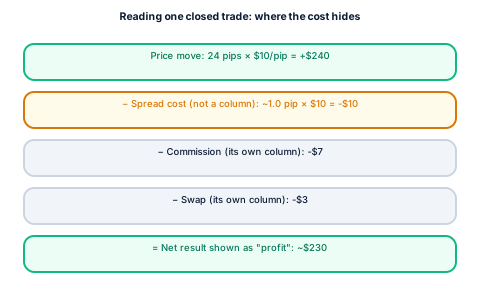
Illustrative inputs: 1.0 lot EUR/USD, opened at 1.10010 (ask), closed at 1.10250 (bid), held one night, commission $7 round-turn, swap −$3 for the one night held, quoted spread at entry 1.0 pip.
- Spread cost (not a statement column): roughly 1.0 pip × $10/pip = $10, already embedded in the 1.10010 open price versus the market's mid-price at that instant.
- Commission (its own column): −$7.
- Swap (its own column): −$3.
- Price move: 1.10250 − 1.10010 = 24 pips × $10/pip = +$240 (before commission and swap).
- Net result shown as "profit": typically $240 − $7 − $3 = $230 on most platforms, though the exact convention for whether commission and swap are pre-netted into the displayed profit figure varies by broker — check your own statement's column totals rather than assuming.
The spread's $10 cost never appears as a labelled line — it's already baked into the difference between your fill price and the market rate, which is why reconstructing your full true cost per trade takes a bit more than reading the "profit" column alone.
Common terms that trip up beginners
- "Deal" vs. "order" vs. "position." A deal is one individual execution; an order is an instruction to trade; a position is the resulting open (or once-open) exposure. MT5 in particular separates these into different report tabs, as covered in our MT4 vs. MT5 guide.
- Partial fills and partial closes. A single intended trade can appear as multiple rows if it was filled or closed in pieces — make sure you're summing all of them, a point covered further in our guide to verifying your rebate volume from trade history.
- Hedged positions. Depending on whether your account runs in hedging or netting mode, an opposite trade on the same instrument can show as a second open position or as a reduction of the existing one — again, see the MT4 vs. MT5 guide for the mechanical difference.
Using your statement to verify rebate-qualifying volume
Your account statement's closed-trade history, not a rebate dashboard alone, is the authoritative source if you ever want to independently check your own qualifying volume. Our dedicated guide to verifying your rebate volume from trade history walks through exactly how to sum lots correctly, including the partial-fill and hedged-position pitfalls mentioned above.
Related reading
- MT4 vs. MT5 for tracking your trading volume and costs — how the two platforms differ in report layout and terminology.
- How to verify your rebate volume from trade history — using your statement to check qualifying volume specifically.
- Forex leverage and margin explained — the full meaning of balance, equity, margin level, margin call, and stop-out.
Frequently asked questions
A trade confirmation records one executed order — symbol, size, price, time. An account statement is the fuller document covering a period: your full trade history plus balance, equity, and margin figures.
Work out your own numbers
Pull up your own account statement and match each column against the definitions above before assuming what a figure means. To see what cashback would add back on your own qualifying volume, try the cashback calculator, or register with CB-Dogs before your next trade.
Risk warning: forex and CFD trading carries a high risk of losing money. Cashback does not offset trading losses. Nothing here is investment advice.
Related articles
Cashback on your XM trades — free, paid in USDT
Sign up free